

Capista AI Customer Assistant
A website assistant for small businesses. It answers customer questions around the clock — services, prices, opening hours — captures their details, and hands anything else to you.
 CapistaOnline · Glow Salon
Customers visit our website after hours or when I’m busy, and I can’t always answer their questions. I worry they’ll leave and contact a competitor before I get back to them.
“When I’m cutting someone’s hair, I can’t stop to answer every call or message.”
“When I’m out on a job, I can’t reply to quote requests. By the time I call back, they’ve hired someone else.”
“The phone keeps ringing while we’re checking patients in. New patients can’t always reach us when they want to book.”
From a question to a follow-up, in five steps.
Capista only uses information your business approves. When a request needs a person, it says so and passes it on.
On your website, at any hour.
Answers from your services, prices, hours and policies.
Details and the full conversation arrive in your inbox.
Call back, confirm or reply — with the full context.
Conceptual workflow. Systems are named once they’re integrated and tested.
Same assistant. Your business’s words.
Twenty kinds of local business, each with its own questions, terms and hand-off rules. Health and care businesses follow after a healthcare data and legal review.
Hair salons
A client asks about a cut and color while you’re mid-appointment. Capista explains services and prices and passes the booking request to your team.
- Services and prices
- Opening hours
- Booking requests
Barbershops
Walk-in or appointment? Capista answers wait-time and service questions while the chairs are full.
- Walk-in questions
- Services
- Time requests
Nail studios
Customers ask about gel, art and how long a set takes. Capista answers from your menu and takes their details.
- Service menu
- Timings
- Callback requests
Spas & massage
Guests ask about treatments, gift cards and availability after hours. Capista answers and sends requests to the front desk.
- Treatments
- Gift cards
- Requests
Fitness studios
Prospects ask about classes, trials and memberships. Capista answers and captures the lead for your team.
- Class schedule
- Trials
- Membership leads
Plumbers
A homeowner has a leak while you’re on a job. Capista collects the job details and zip code so you can quote on your next break.
- Job details
- Service area
- Callback requests
Electricians
Customers ask what you cover and when you can come out. Capista takes the job details and urgency for your callback.
- Services covered
- Urgency
- Callback requests
HVAC
When the AC fails on a hot evening, Capista answers, logs the problem and passes it to your on-call team.
- Repairs
- Maintenance plans
- Service requests
Cleaning services
People ask for a quote on a deep clean. Capista collects home size, frequency and address for a quick estimate.
- Quotes
- Frequency
- Service area
Landscapers
Homeowners ask about seasonal work and quotes. Capista answers and books in a site-visit request.
- Seasonal services
- Quotes
- Site visits
Auto repair
Drivers ask whether you can look at a problem today. Capista collects the car and symptoms so you can quote.
- Services
- Car details
- Drop-off requests
Car detailing
Customers compare packages and ask about mobile service. Capista explains your packages and takes the request.
- Packages
- Mobile service
- Requests
Pet grooming
Pet owners ask about breeds, prices and the next opening. Capista answers and passes the request to your groomers.
- Breeds and prices
- Openings
- Requests
Tutoring centers
Parents ask about subjects, ages and schedules in the evening. Capista answers and captures the inquiry.
- Subjects
- Schedules
- Inquiries
Photographers
Couples and families ask about packages and dates. Capista explains packages and passes the inquiry to you.
- Packages
- Date requests
- Inquiries
Dental practices
Patient questions and appointment requests, once the healthcare data and legal review is complete. Capista never gives clinical advice.
- Opening hours
- New-patient questions
- Appointment requests
Chiropractors
Patients ask about first visits and hours. Capista answers from approved information and passes requests to the office.
- First visits
- Hours
- Requests
Physical therapy
People ask whether you treat their injury and how to start. Capista takes their details for the clinic team.
- Services
- Getting started
- Requests
Veterinary clinics
Pet owners ask about hours and new-patient visits. Capista answers and sends requests to the front desk.
- Hours
- New patients
- Requests
Optometrists
Patients ask about eye exams and frames. Capista answers from your information and passes requests to the office.
- Exams
- Frames
- Requests
Six features. Three to start.
Planned features stay labeled until they work — here and in every demo.
24/7 customer support
Answers common customer questions about services, pricing, business hours, policies and availability — even when you’re closed.
At launchLead capture and qualification
Collects a prospective customer’s contact details, identifies what they need and records the inquiry for follow-up.
At launchHuman hand-off
Passes complex or sensitive requests to the right person, with the conversation attached.
At launchAppointment booking
Lets customers book, reschedule or cancel through your scheduling system, once that connection is built and tested.
PlannedCRM and customer management
Keeps customer details, conversation history, inquiries and follow-ups in one place.
PlannedFollow-ups and reporting
Confirmations, reminders and reports on conversations and leads.
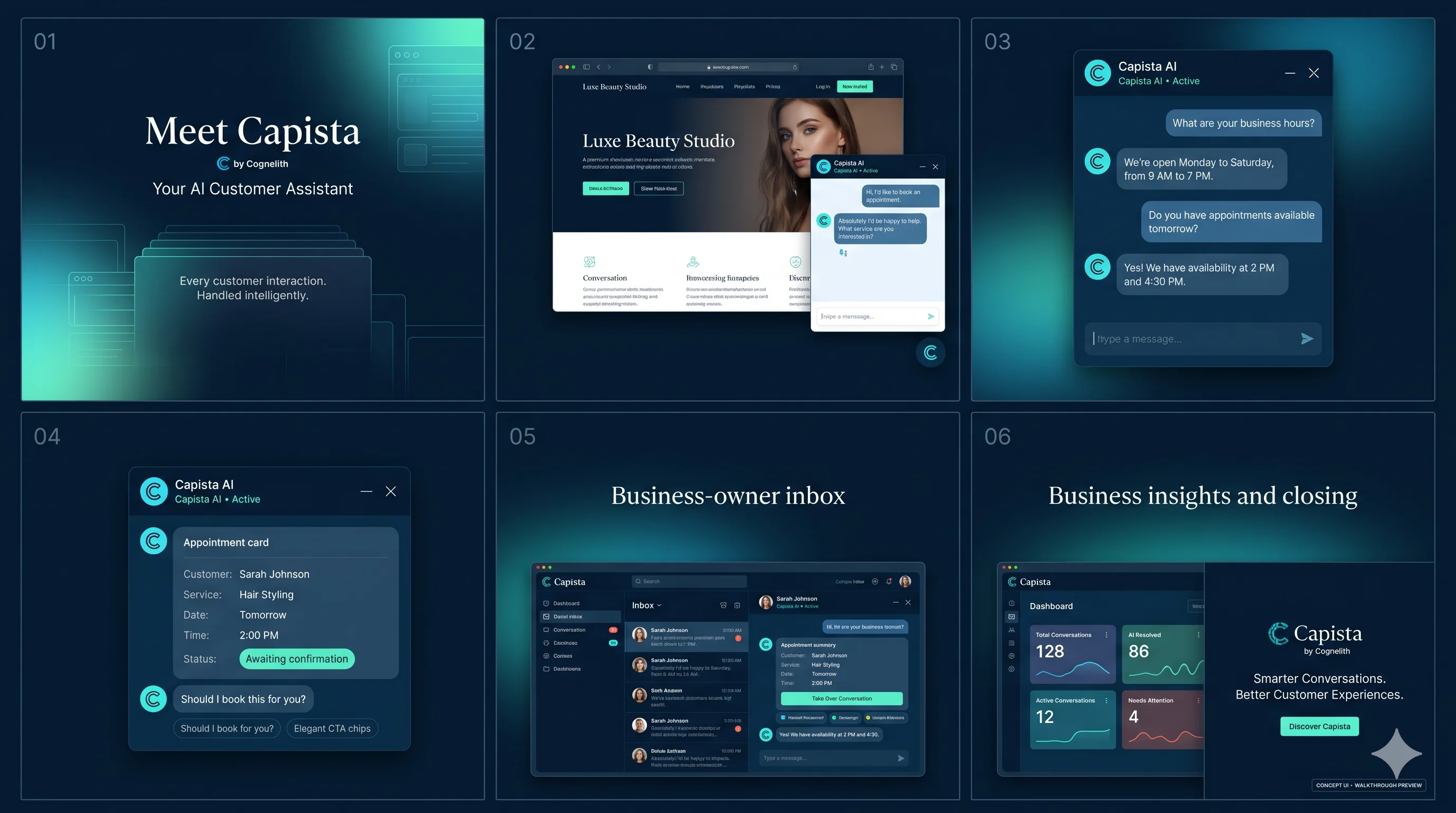
PlannedHow Capista works, in six scenes.
A salon example: a customer asks about services and times, Capista answers from approved information, captures an appointment request, and the owner sees it in the inbox.
Set up with you, not a project for you.
We configure it with you. You keep control of every answer it can give.
Share your services, prices, hours, and policies. You decide what the assistant can answer.
A simple setup, with our help if needed. No website redesign or downloads required.
Ask us anythingYour assistant answers questions 24/7, captures leads, and forwards complex requests to you.
What it connects to.
We publish each integration and its status once the connection is verified. Until then, these are the areas we plan to support.
- Website
- Embeds on your existing site. At launch
- Scheduling
- Booking requests into your calendar. Planned
- Customer records
- Leads and conversations in your CRM. Planned
- Email and text
- Confirmations and follow-ups. Planned
What your customers are told.
A short notice in the chat, and a full Privacy Policy on your site. Plain words, no claims we can’t back.
You are chatting with an AI assistant. To help with your request, it may ask for your name, contact details or other relevant information.
Please avoid sharing sensitive personal, medical or financial information in this chat.
- AI disclosure
- Customers are always told they’re talking to an AI assistant.
- What’s collected
- Name, contact details, messages and appointment requests.
- Who sees it
- The business they contacted, and its authorized service providers.
- Sensitive details
- Customers are asked not to share medical or financial information in chat.
- Retention
- [How long data is kept, or how that is decided.]Content neededHow long data is kept, or how that is decided.Owner: Legal counsel
- Status
- Developing our security and privacy framework. No certifications claimed.
Proposed plans.
Plan names and contents are proposals. We’ll publish prices once costs and usage limits are validated. Until then, book your free demo and we’ll walk you through what fits.
Starter
- Website assistant
- Answers to common questions
- Basic lead capture
- Conversation history
- Up to [number] conversations a month
Professional
- Everything in Starter
- More customization
- Up to [number] conversations a month
- Booking connections · planned
- Follow-ups and reporting · planned
Custom
- Multi-location setups
- Custom workflows and onboarding
- Advanced integrations
- Tailored usage and support
Not sure which plan fits? We’ll recommend one in your demo, based on your questions and volume. A one-time setup fee may apply for configuration and website integration.
Book Your Free DemoQuestions owners ask us.
Does it replace my front desk?
No. It handles routine questions and takes details, and hands anything complex or sensitive to your team.
What happens when it doesn’t know an answer?
It says so, takes the customer’s details and passes the conversation to you. It never invents prices, policies or availability.
Can it book appointments?
Booking is planned. At launch it captures appointment requests and sends them to you to confirm.
Does it chat in Spanish?
Our website is available in Spanish. Spanish conversations in Capista are being tested and will be confirmed before we offer them.
Can it make mistakes?
Yes. Like any AI assistant, it can get things wrong or miss a request. It only answers from the information you approve, and when it isn’t sure, it says so and passes the conversation to you.
Do my customers need to download anything?
No. The assistant runs on your website.
Is my customers’ data safe?
We tell customers what is collected and why, and ask them not to share sensitive details in chat. We are developing our security and privacy framework and don’t claim certifications we don’t hold.
See Cognelith AI in action.
A 30-minute, personalized demo built around your services, your questions and your hours.